Home / App Guide / Petrol prices
How to compare petrol prices in Singapore and find the cheapest station
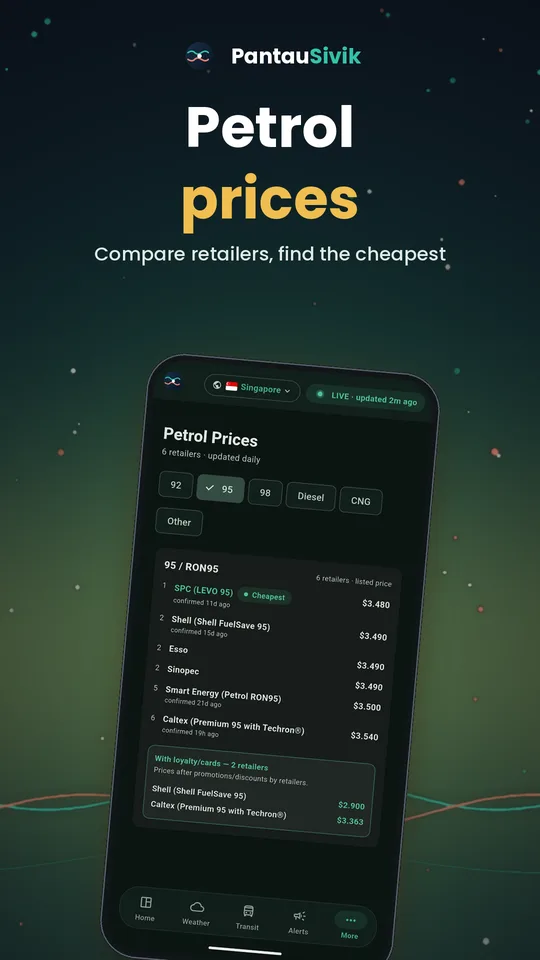
Short answer: open Petrol Prices, tap your fuel grade (92, 95, 98 or Diesel) and read the cheapest listed prices at the top. Card discounts sit in a separate box so the ranking stays fair.
What you will see
- Grade tabs for 92, 95, 98 and Diesel. You only see the grade your car uses.
- A cheapest first ranking using each retailer's listed pump price, so everyone is compared on the same basis.
- A loyalty and cards box for retailers that also publish a discounted price. It is kept apart from the ranking, because those prices need a card.
- Other blends for premium products that do not map to a clean octane number.
How to use it
- Open Petrol Prices from the dashboard card or the More menu.
- Tap the tab for your fuel grade.
- Read the cheapest listed prices first. This is the price anyone pays without a card.
- If you own a card from one of the retailers, look in the loyalty and cards box to see whether it beats the cheapest listed price.
- Use the price together with how far you would drive. A few cents a litre can disappear on a long detour.
Tips
- The dashboard has a small Petrol Price card with the cheapest few prices for each grade. Collapse it if you do not need it.
- Prices are the retailers' published pump prices and can change. Treat them as a guide and check the pump board.
Good to know
Prices are collected from each retailer's own published price board. Card prices only appear for retailers that publish them. Petrol Prices is a Singapore feature. Malaysia has its own weekly fuel price view.
Information comes from public sources and is there to help you plan. PantauSivik is independent and not affiliated with any government agency. Screens and wording can change a little between app versions.
Frequently asked questions
Which fuel grades does PantauSivik show?
92, 95, 98 and Diesel, plus an Other blends group for premium products without a clean octane number.
Are the prices after card discounts?
The ranking uses listed pump prices. Card or loyalty prices are shown in a separate box.
How often do prices update?
They follow what each retailer publishes. Always check the board at the pump before you fill up.
Is there a fuel price view for Malaysia?
Yes. Malaysia shows the weekly fuel price and how it changed from the previous week.