Home / App Guide / EV charging
How to find an EV charger in Singapore and see if it is free
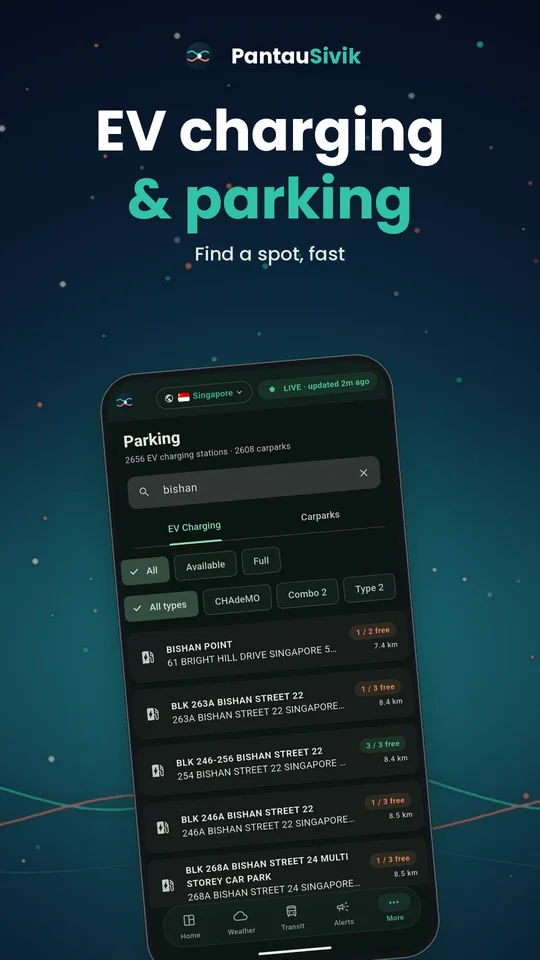
Short answer: open the EV Charging tab in PantauSivik, allow location, and the closest stations appear first. Pick your plug type, check how many connectors are free, then tap Directions.
What you will see
- A list of stations sorted by distance when the app knows where you are.
- Live availability for each station, so you can see how many connectors are free before you drive over.
- Charger type chips such as the plug types actually in use across the island. The list comes from live data, so new plug types show up on their own.
- A detail view for each station that lists every connector it has.
How to use it
- Open EV Charging in the Parking section. It sits beside the Carparks tab.
- Allow location when asked, so the list can start with the closest stations. You can also type a place or station name in the search box.
- Tap a plug type chip to hide stations that do not suit your car.
- Tap a station to open its detail view and see each connector and whether it is free.
- Tap Directions to plan the drive. It starts in drive mode, and you can change the route in Trip Planner.
Tips
- Check availability just before you set off. A connector that was free ten minutes ago may not be free now.
- No luck nearby? Search for the area you are heading to instead of where you are now.
- Opening hours are not shown, because the public data does not include them. If you are unsure, check the operator before a long trip.
Good to know
Station and availability data comes from the Land Transport Authority and refreshes every few minutes. A free connector is a guide, not a reservation. EV charging in the app is for Singapore.
Information comes from public sources and is there to help you plan. PantauSivik is independent and not affiliated with any government agency. Screens and wording can change a little between app versions.
Frequently asked questions
Does PantauSivik show if an EV charger is free right now?
Yes. Each station shows live availability from public data, which refreshes every few minutes.
Can I filter by plug type?
Yes. Use the plug type chips at the top of the EV Charging tab. The chips are built from the plug types currently in the data.
Does it show charging prices or opening hours?
No. The public data does not carry opening hours or prices, so check the charging operator for those.
Does it work in Malaysia?
EV charging in PantauSivik covers Singapore.