Home / App Guide / Weather and air
How to read weather, PSI, UV and heat stress in Singapore
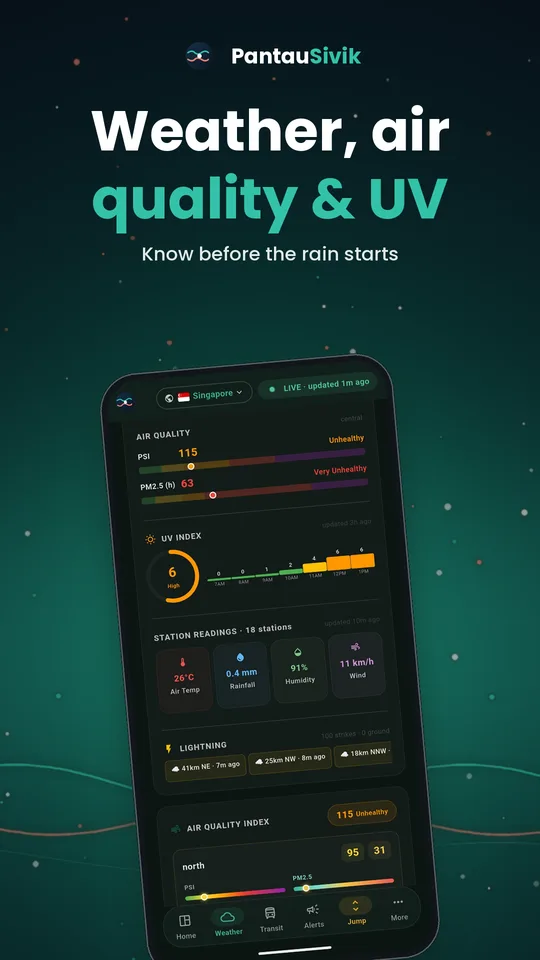
Short answer: open Weather for the full picture. Check PSI for the air and UV for the sun, and switch on the Environment alert in Settings if you want a nudge when either changes.
What you will see
- Current conditions: temperature, feels like, humidity and wind speed with direction.
- A 24 hour outlook split into parts of the day. It opens on the part you are in.
- PSI and PM2.5 for the part of Singapore you are in.
- UV index for the day.
- Heat stress readings, plus lightning with distance and direction from you, and tide timings.
How to read the numbers
PSI (air quality)
- 0 to 50: good
- 51 to 100: moderate
- 101 to 200: unhealthy
- 201 to 300: very unhealthy
- Above 300: hazardous
UV index
- 0 to 2: low
- 3 to 5: moderate
- 6 to 7: high
- 8 to 10: very high
- 11 and above: extreme
How to use it
- Open Weather and allow location. The page picks the area nearest to you.
- Check the outlook for the part of the day you will be outside.
- Look at PSI before outdoor exercise, and UV before a long time in the sun.
- Check the lightning section on stormy afternoons to see how far away the strikes are.
- Want a heads up? Open Settings and switch on the Environment alert. You will hear when air quality gets worse or better, and when the UV index reaches 8. Tapping the alert opens Weather.
Good to know
Weather, air quality, UV, heat stress and lightning come from public National Environment Agency sources. The Environment alerts are for Singapore. Bands above are the standard ones. For health advice, follow guidance from the authorities.
Information comes from public sources and is there to help you plan. PantauSivik is independent and not affiliated with any government agency. Screens and wording can change a little between app versions.
Frequently asked questions
What is a good PSI in Singapore?
A PSI of 0 to 50 is considered good. 51 to 100 is moderate, and above 100 is unhealthy.
What UV index is dangerous?
From 8 the UV index is very high, and from 11 it is extreme. Cover up and limit time in direct sun.
Can I get alerts for haze or UV?
Yes. Switch on the Environment alert in Settings. It covers air quality changes and UV index 8 or above.
Does it show lightning?
Yes. The Weather page shows lightning with its distance and direction from you.