How to check MRT and LRT platform crowds before you leave
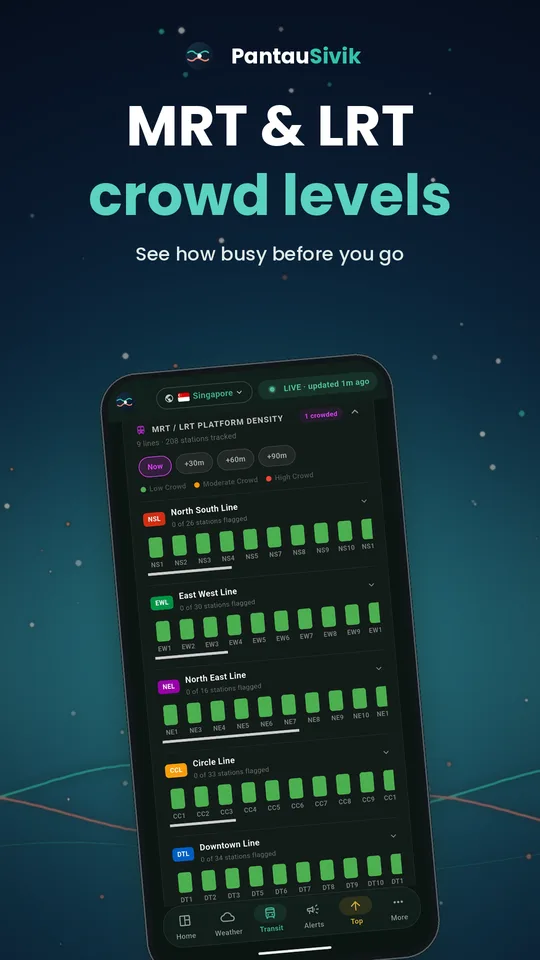
A crowded platform can add stress and minutes to a journey. PantauSivik shows platform crowd levels for MRT and LRT lines, so you can plan around the squeeze instead of walking into it.
Reading the crowd view
Open the Transit page and scroll to the MRT and LRT platform density section. Each line is shown with a bar for every station, coloured by how crowded the platform is, from low crowd through moderate crowd to high crowd.
Look ahead, not just now
Switch between Now, +30, +60 and +90 minutes to see how crowds are forecast to change. If your usual train is busy right now, a short delay might get you a calmer platform.
Pair it with live bus arrivals
If you reach the station by bus, check the arrival times for your stop first, then check the platform crowd at your station. Together they tell you when to leave and which option is less crowded.
Quick tips
- Check before you leave, not when you arrive.
- At interchanges, compare lines and pick the calmer option.
- Use Now against +30 to decide whether waiting a little is worth it.
- Save your regular bus stops for one-tap access.
Crowd levels are estimates based on public data. Actual conditions may differ.